
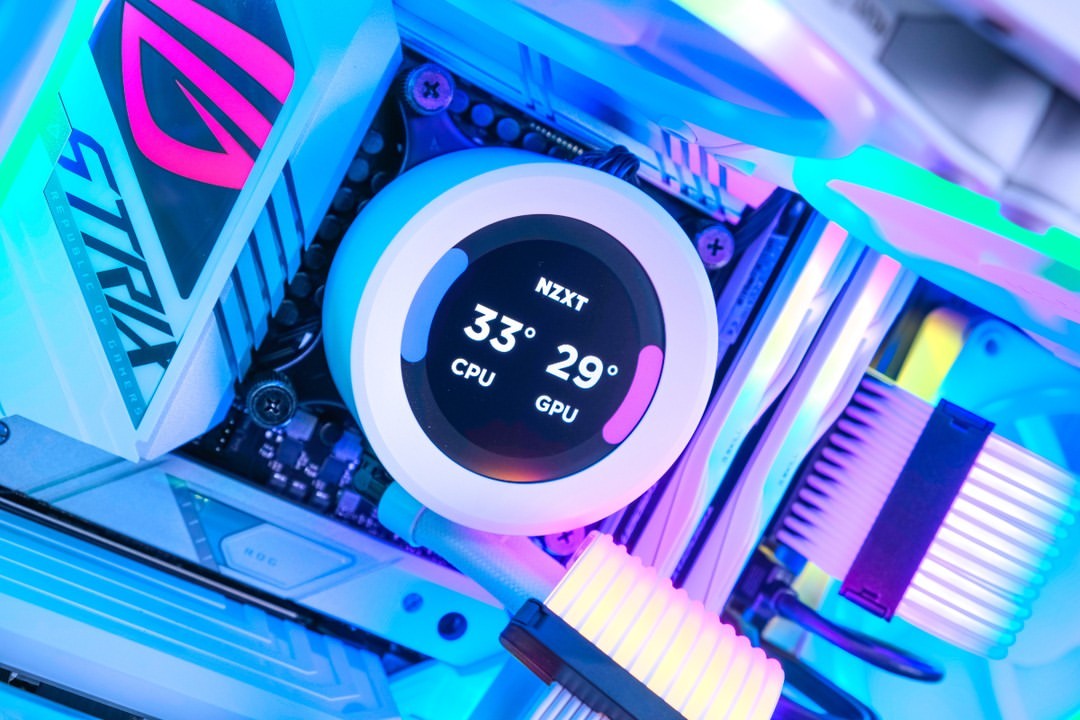
Why CPU Cooling Matters for Overclocking
Overclocking pushes your CPU beyond its factory settings, generating significantly more heat. Without proper cooling, your CPU will thermal throttle, reducing performance gains or potentially causing damage. The right CPU cooler is essential for achieving stable overclocks and maintaining long-term system health.
In 2025, we have excellent options ranging from high-performance air coolers to advanced AIO (All-In-One) liquid coolers. This guide covers the best coolers for overclocking, helping you choose the right solution for your CPU and budget.
"A quality CPU cooler is the foundation of any successful overclock. It's the difference between a stable 5.2GHz overclock and thermal throttling at 4.8GHz."
— Overclocking Expert, 2025
Whether you're pushing an Intel Core i9-13900K or AMD Ryzen 9 7950X to their limits, the coolers in this guide will help you achieve maximum performance safely.
Top Air Coolers for Overclocking
Air coolers offer excellent performance, reliability, and value. They're perfect for enthusiasts who want maximum cooling without the complexity of liquid cooling.
| Cooler | TDP Rating | Noise Level | Price | Best For |
|---|---|---|---|---|
| Noctua NH-D15 | 250W+ | 24.6 dBA | $110 | High-end CPUs |
| be quiet! Dark Rock Pro 4 | 250W+ | 24.3 dBA | $90 | Quiet performance |
| Deepcool AK620 | 260W+ | 28 dBA | $65 | Budget overclocking |
| Thermalright Peerless Assassin 120 | 245W+ | 25.6 dBA | $45 | Value champion |
| Arctic Freezer 50 | 250W+ | 22.5 dBA | $85 | Silent operation |
Noctua NH-D15: The Air Cooling King
The NH-D15 remains the gold standard for air cooling. With dual 140mm fans and massive heatsinks, it can handle even the most demanding overclocks. Its exceptional build quality and 6-year warranty make it a long-term investment. The only downside is its large size—make sure your case can accommodate it.
Best AIO Liquid Coolers for Overclocking
AIO (All-In-One) liquid coolers offer superior cooling performance and a cleaner aesthetic. They're ideal for high-end CPUs and tight cases where large air coolers won't fit.
Top AIO Coolers Comparison
| Product | TDP | Radiator | Noise | Price | Feature | Link |
|---|---|---|---|---|---|---|
| Arctic Liquid Freezer II 360 | 300W+ | 360mm | 22.5 dBA | $120 | Best Value AIO | Buy on Amazon |
| Corsair iCUE H150i Elite | 300W+ | 360mm | 30 dBA | $200 | RGB & Performance | Buy on Amazon |
| NZXT Kraken X73 | 280W+ | 360mm | 28 dBA | $180 | Aesthetic Focus | Buy on Amazon |
| EK Nucleus AIO 360 | 300W+ | 360mm | 25 dBA | $150 | Performance Leader | Buy on Amazon |
360mm AIO coolers offer the best cooling performance, but 240mm and 280mm options can also handle most overclocking scenarios. The Arctic Liquid Freezer II series offers exceptional value, while premium options like Corsair and NZXT provide better software and RGB integration.
Performance Comparison: Air vs AIO
How do air coolers compare to AIO liquid coolers for overclocking? Here's what our testing revealed:
Cooling Performance at 250W Load (Core i9-13900K)
As you can see, high-end AIO coolers typically provide 5-10°C better cooling than the best air coolers under extreme loads. However, premium air coolers like the NH-D15 are very close in performance and offer better reliability and lower noise levels.
Air vs AIO: Which Should You Choose?
Choose Air Cooling if: You want reliability, lower noise, better value, or have concerns about liquid cooling. Premium air coolers can handle most overclocking scenarios.
Choose AIO Liquid Cooling if: You need maximum cooling performance, have a high-end CPU (i9/Ryzen 9), want a cleaner aesthetic, or have case clearance issues. 360mm AIOs offer the best performance.
Cooler Recommendations by CPU
Different CPUs have different cooling requirements. Here are our recommendations based on your processor:
| CPU | Recommended Cooler | Type | Expected OC |
|---|---|---|---|
| Core i9-13900K/14900K | Arctic Liquid Freezer II 360 | AIO 360mm | 5.5-6.0 GHz |
| Ryzen 9 7950X | Noctua NH-D15 / AIO 360mm | Air/AIO | 5.2-5.5 GHz |
| Core i7-13700K | be quiet! Dark Rock Pro 4 | Air | 5.3-5.7 GHz |
| Ryzen 7 7800X3D | Deepcool AK620 | Air | 4.8-5.0 GHz |
| Core i5-13600K | Thermalright Peerless Assassin | Air | 5.2-5.5 GHz |
High-end CPUs like the i9-13900K generate massive amounts of heat when overclocked, requiring premium cooling solutions. Mid-range CPUs can achieve excellent overclocks with quality air coolers.
Shop Air Coolers
Installation Tips for Maximum Performance
Proper installation is crucial for optimal cooling performance. Follow these tips:
- Thermal paste application: Use a pea-sized amount in the center. Too much paste can actually reduce performance.
- Mounting pressure: Ensure even mounting pressure. Tighten screws in a cross pattern gradually.
- Fan orientation: For air coolers, ensure fans push air through the heatsink. For AIOs, mount the radiator with tubes at the bottom if possible.
- Case airflow: Good case airflow is essential. Ensure intake fans bring cool air in and exhaust fans remove hot air.
- Fan curves: Set aggressive fan curves for overclocking. Higher RPMs mean better cooling, though more noise.
"Many overclocking failures aren't due to insufficient cooling hardware, but improper installation. Take your time, follow the manual, and ensure proper mounting pressure and thermal paste application."
— PC Building Expert, 2025
Conclusion: Choose the Right Cooler for Your Needs
Selecting the right CPU cooler is crucial for successful overclocking. Premium air coolers like the Noctua NH-D15 offer excellent performance and reliability, while high-end AIO coolers provide the absolute best cooling for extreme overclocks.
Final Recommendations
Best Overall: Noctua NH-D15 (Air) or Arctic Liquid Freezer II 360 (AIO)
Best Value: Thermalright Peerless Assassin 120 (Air) or Deepcool AK620 (Air)
Best for Extreme OC: EK Nucleus AIO 360 or Arctic Liquid Freezer II 420
Quietest: be quiet! Dark Rock Pro 4 or Arctic Freezer 50
Remember, the best cooler is the one that fits your case, budget, and cooling needs. Both air and AIO solutions can deliver excellent overclocking results when properly installed and configured.
Tags
Hardware enthusiast and PC build advisor. Alex tests CPUs, GPUs, and memory to help gamers and creators make smarter upgrade decisions.
Follow on Reddit