
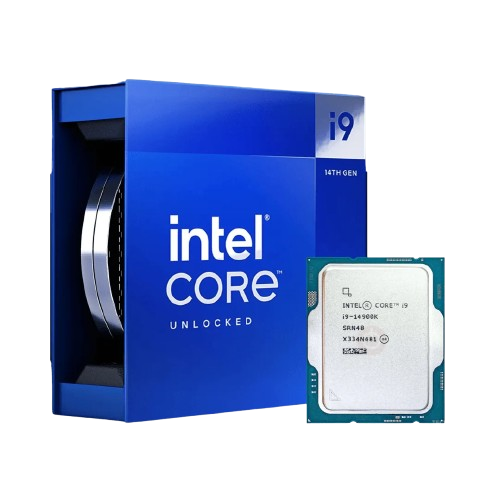
Intel Core i9-14900K
Raptor Lake Refined. Experience unprecedented performance with 24 cores and 32 threads, delivering up to 6.0 GHz max turbo frequency. Built for gamers, creators, and power users who demand the absolute best.
Performance Hybrid Architecture
Performance-cores (P-cores)
- Optimized for single-threaded tasks
- Maximum gaming performance
- Up to 6.0 GHz boost clock
- 8 P-cores, 16 threads
Efficient-cores (E-cores)
- Handles background tasks efficiently
- Multi-threaded workload acceleration
- Up to 4.4 GHz boost clock
- 16 E-cores, 16 threads
Accelerate Your Creativity
Performance in professional content creation applications
Adobe Premiere Pro
Blender
Handbrake
DaVinci Resolve
Photoshop
After Effects
Stats & Tuning
Advanced Technologies
Intel Turbo Boost Max 3.0
Identifies best cores for peak performance. Automatic frequency optimization for single-threaded workloads.
Intel Thermal Velocity Boost
Opportunistic frequency increase based on temperature and power headroom. Maximizes performance when thermal conditions allow.
Intel Thread Director
AI-powered task scheduling for optimal P-core and E-core utilization. Ensures the right workload runs on the right core.
Intel Application Optimization (APO)
Game-specific optimizations delivering up to 15% FPS improvement in supported titles. Software-based performance enhancement.
Intel Speed Optimizer
One-click performance enhancement with safe, automated overclocking. AI-guided tuning for your system.
Intel Deep Learning Boost
AI workload acceleration for enhanced productivity. Optimized instructions for machine learning inference.
Intel Core i9-14900K vs Competition
| Specification | Intel Core i9-14900K | AMD Ryzen 9 7950X | Intel Core i9-13900K | AMD Ryzen 9 7900X |
|---|---|---|---|---|
| Architecture | Raptor Lake Refined (Intel 7) | Zen 4 (TSMC 5nm) | Raptor Lake (Intel 7) | Zen 4 (TSMC 5nm) |
| Total Cores | 24 (8P + 16E) | 16 | 24 (8P + 16E) | 12 |
| Total Threads | 32 | 32 | 32 | 24 |
| Base Frequency (P-core) | 3.2 GHz | 4.5 GHz | 3.0 GHz | 4.7 GHz |
| Max Turbo Frequency (P-core) | 6.0 GHz WINNERGewinner | 5.7 GHz | 5.8 GHz | 5.6 GHz |
| Max Turbo Frequency (E-core) | 4.4 GHz | N/A | 4.3 GHz | N/A |
| Cache (L2 + L3) | 36 MB Smart Cache + 32 MB L2 | 64 MB L3 + 16 MB L2 | 36 MB Smart Cache + 32 MB L2 | 64 MB L3 + 12 MB L2 |
| TDP / PBP | 125W | 170W | 125W | 170W |
| Maximum Turbo Power | 253W | 230W | 253W | 230W |
| Memory Support | DDR4/DDR5 | DDR5 only | DDR4/DDR5 | DDR5 only |
| PCIe Lanes | 20 (16x Gen 5 + 4x Gen 4) | 28 (Gen 5) | 20 (16x Gen 5 + 4x Gen 4) | 28 (Gen 5) |
| Integrated Graphics | UHD Graphics 770 | Radeon Graphics | UHD Graphics 770 | Radeon Graphics |
| Overclockable | Yes (Unlocked) | Yes (PBO) | Yes (Unlocked) | Yes (PBO) |
| MSRP | $589 | $699 | $589 | $549 |
| Gaming Performance Score | 98/100 WINNERGewinner | 95/100 | 94/100 | 92/100 |
| Productivity Performance Score | 96/100 | 98/100 | 94/100 | 93/100 |
Where to Buy Intel Core i9-14900K
Prices may vary. We may earn a commission from qualifying purchases.
Frequently Asked Questions
What GPU pairs best with the Intel Core i9-14900K?
Will Intel Core i9-14900K bottleneck an RTX 4090?
Do I need a Z790 motherboard?
What's the difference between P-cores and E-cores?
Can I overclock the Intel Core i9-14900K?
What cooling do I need?
Does it support DDR4 or DDR5?
What is Intel Application Optimization (APO)?
Ready for Intel Core i9-14900K?
Check if your system is ready for the Intel Core i9-14900K