
Power Supply (PSU) Wattage Calculator

Calculate the exact power supply wattage needed for your custom PC build.

Estimated System Wattage

0W
CPU Power0W
GPU Power0W
Motherboard & Fans95W
Recommended PSU
---

Add your CPU and GPU power ratings together. Include 75 watts for the motherboard and fans. Then add 20 percent headroom. The final number is your minimum recommended PSU wattage.

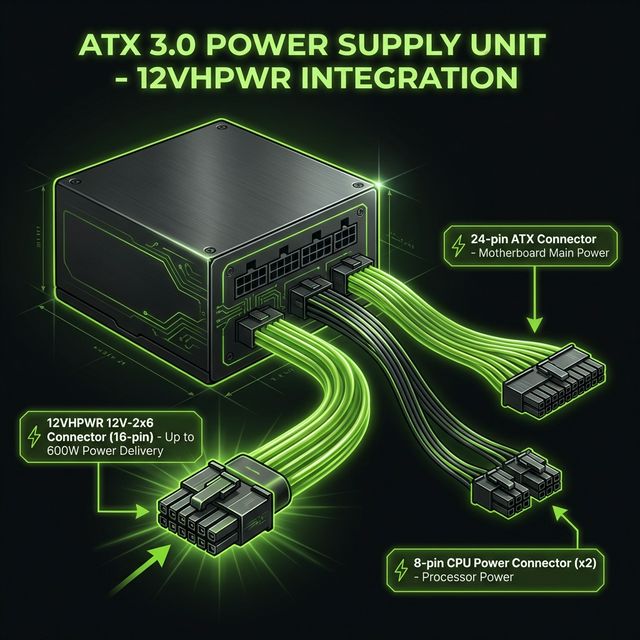
ATX 3.0 power supply 12VHPWR connector pinout diagram showing the 16-pin 12V-2x6 cable layout used by modern PCIe 5.0 graphics cards

ATX 3.0 Design Guide: The 12VHPWR connector supports up to 600W of continuous power through a single cable.

Why the 20 Percent Buffer Matters

Your GPU does not pull a steady stream of electricity. It demands sudden bursts of power that last only microseconds. Engineers call these transient power spikes. A card rated at 300W TDP can spike to 600W for a fraction of a second during heavy scenes.

The ATX 3.0 standard, published in Intel's ATX design guide, addresses this directly. It requires power supplies to handle up to 200 percent of their rated power for short intervals without shutting down. The new PCIe 5.0 12VHPWR cable was designed alongside this standard.

Adding 20 percent continuous headroom means your power supply operates in its efficiency sweet spot (around 50 to 80 percent load). This reduces heat inside the chassis, keeps the fan quieter, and extends the lifespan of the unit.
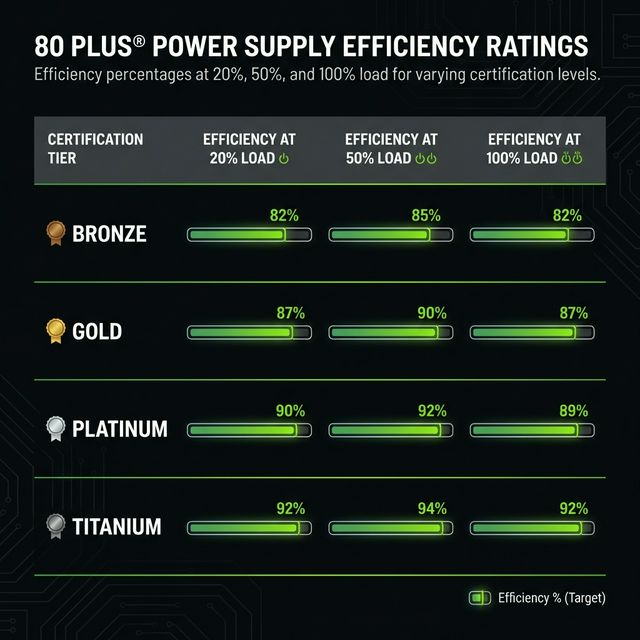
80 Plus efficiency certification chart comparing Bronze Gold Platinum and Titanium power supply ratings at 20 50 and 100 percent load

80 Plus efficiency tiers: Gold units convert at least 87% of wall power into usable DC power at 20% load.

Efficiency Ratings, Explained Simply

Every power supply wastes some electricity as heat. The 80 Plus rating measures how much wall power actually reaches your components. A Bronze unit converts roughly 82 percent at typical load. A Gold unit converts about 87 percent. That missing percentage turns into heat inside your case.

This matters more than most builders think. Electricity costs and power grid stability vary by region. If you live somewhere with high energy rates, a Gold or Platinum unit pays for itself within two to three years of normal use. In regions with unstable grids, the cleaner power delivery also protects your hardware from voltage fluctuations.

For most gaming builds, 80 Plus Gold hits the best balance between price and long term savings. Platinum and Titanium units make financial sense only for workstations and servers that run 24/7.

Plan for the Next GPU Generation

Every new generation of graphics cards demands more power than the last. The jump from NVIDIA's RTX 3080 (320W) to the RTX 4090 (450W) proved this clearly. Buying a power supply with 100 watts above your current recommendation means you can swap in a new GPU without replacing the PSU.

A quality 850W Gold unit costs around $30 more than a 750W unit. That $30 saves you from spending $120 on a complete replacement when the next flagship card lands. Think of the extra capacity as insurance for your next upgrade cycle.

Frequently Asked Questions

Do I need an ATX 3.0 power supply?
You need an ATX 3.0 unit if your GPU uses a 12VHPWR or 12V-2x6 cable. These connectors handle the high transient power spikes that new NVIDIA and AMD cards produce. Older units can work with adapters, but a native ATX 3.0 PSU removes that risk entirely.
What happens if my PSU is too weak?
Your PC will crash under load, often during gaming or rendering. Modern GPUs trigger short power spikes that can exceed their rated TDP by 200 percent for a few microseconds. A weak power supply trips its own safety circuits during these spikes, causing instant shutdowns or restarts.
Is 80 Plus Gold worth the extra cost over Bronze?
Yes, in most cases. A Gold unit wastes less electricity as heat, which also keeps your system cooler and quieter. Over three years of typical use, the electricity savings often pay back the price difference. This matters even more if your local electricity rates run above average.
How do I know my PSU wattage is enough for my GPU?
Check your GPU's TDP rating on the manufacturer's website. Add your CPU's TDP and 75 watts for motherboard, fans, and storage. Multiply that total by 1.2 for headroom. If your current PSU meets or exceeds that number, you have enough wattage.
Can I use a 12VHPWR adapter with an older PSU?
You can, but it comes with trade-offs. Adapter cables split the load across two or three 8-pin PCIe connectors. This works for most cards, but it does not protect against the extreme transient spikes that ATX 3.0 units handle natively. If your older unit has enough wattage and quality rails, an adapter will get the job done safely in most situations.
What is the difference between single rail and multi rail PSUs?
A single rail PSU sends all its 12V power through one circuit. A multi rail unit splits the 12V output across separate circuits, each with its own overcurrent protection. Single rail units offer simpler cable management. Multi rail units add an extra layer of safety because a short on one rail will not pull full power from the entire supply.
Does a higher wattage PSU use more electricity at idle?
No. Your components determine how much power the system draws, not the PSU's rated wattage. An 850W unit powering a system that idles at 80W draws roughly the same wall power as a 550W unit in the same setup. The main difference shows up in efficiency. Most units hit peak efficiency between 50 and 80 percent load.
How long does a power supply last?
A quality unit from a trusted brand typically lasts 7 to 10 years with daily use. Premium models often carry warranties that match this lifespan. Capacitor quality determines longevity more than anything else. Japanese-made capacitors rated at 105 degrees Celsius outlast cheaper alternatives by a wide margin.
Should I buy a fully modular or semi-modular PSU?
Fully modular units let you connect only the cables you need. This keeps your case cleaner and improves airflow. Semi-modular units permanently attach the 24-pin motherboard cable and sometimes the CPU power cable, which you always need anyway. Semi-modular saves a few dollars while still offering good cable management. Pick fully modular if you want the cleanest build possible.
What size PSU do I need for an RTX 4090 or RTX 5090?
NVIDIA recommends at least 850W for the RTX 4090 and 1000W for the RTX 5090. These cards spike well above their rated TDP during heavy scenes. Pairing them with a high-end CPU like the i9-14900K or Ryzen 9 7950X pushes total system draw even higher. An 850W to 1000W 80 Plus Gold ATX 3.0 unit gives you the headroom and connector support these cards require.