This Sound Can Remove Water from Your Phone Speaker in Seconds

Table of Contents
Did your phone fall in water? Don’t panic. You don’t need to bury it in rice. There is a faster and safer way to clear out trapped liquid using nothing more than sound.
Modern smartphones have advanced designs, but not every model is fully waterproof. When water seeps into the speaker grill, it can leave your audio muffled or distorted. That is where Fix My Speaker comes in, a simple online tool that uses sound waves to eject moisture and dust from your phone.
How to Get Water Out of Your Speaker Using Sound
The process is quick and works for most Android and iPhone devices.
Go to Fix My Speaker and you will see three cleaning options: Water Ejection, Dust Removal, and Deep Vibration.
Each mode plays a unique frequency designed for a specific purpose.
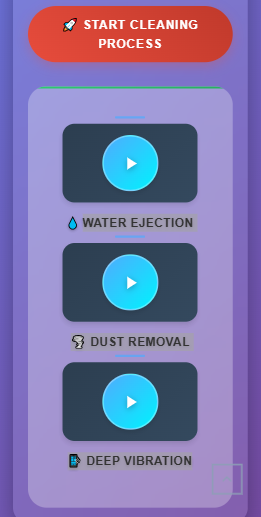
Water Ejection plays a low-frequency tone that forces air through the speaker mesh and pushes out trapped water droplets.
Dust Removal uses a sharper frequency that shakes loose fine dust particles stuck in the speaker grill.
Deep Vibration combines multiple sound patterns for a stronger cleaning effect, helping to remove both moisture and dust at the same time.
All three modes work directly from your browser. There are no downloads, logins, or installations required. Just tap the button, let the sound play for a few seconds, and your speaker will begin to clear itself naturally.
Why This Sound Trick Works
Speakers create sound through vibration. When water or dust collects inside, those vibrations weaken and your phone loses clarity.
Fix My Speaker generates controlled sound waves that make the speaker move fast enough to shake away moisture and debris.
It is based on the same principle as ultrasonic cleaning devices, which professionals use to remove tiny particles without damage. This method brings that same idea to everyday smartphone users.
If you are using an Apple device, you can also follow this step-by-step guide on how to remove water from iPhone for more detailed instructions.
What to Do Before You Start
- Wipe your phone gently with a soft, dry cloth to remove surface water.
- Avoid using hair dryers or applying heat directly to the speaker area.
- Keep your phone facing down so gravity can help the moisture escape.
After running the sound for several seconds, test your audio. Most users notice an immediate improvement in clarity and volume.
The Takeaway
Putting your phone in rice might dry the exterior, but it cannot remove the moisture trapped behind the speaker. Fix My Speaker uses sound vibration to safely push out hidden droplets and dust particles in seconds.
If your phone sounds muffled after exposure to water or dust, open Fix My Speaker, choose Water Ejection, Dust Removal, or Deep Vibration, and let sound frequencies restore your speaker’s clear and natural tone.